contourrs quickstart
Fast raster polygonization in pure Rust with Python bindings.
The ndarray API resembles rasterio.features.shapes but returns an eager list rather than an iterator.
The Rust core has no GDAL dependency.
Create a sample raster
Simulate a classified segmentation mask with 4 land cover classes.
rng = np.random.default_rng(42)
raster = rng.integers(1, 5, size=(128, 128), dtype=np.uint8)
print(f"Raster shape: {raster.shape}, dtype: {raster.dtype}")
print(f"Unique values: {np.unique(raster)}")
Raster shape: (128, 128), dtype: uint8
Unique values: [1 2 3 4]
GeoJSON output
Returns an eager list[tuple[dict, float]] of geometries and values.
rasterio.features.shapes yields geometry-value pairs through an iterator.
results = shapes(raster, connectivity=4)
print(f"Number of polygons: {len(results)}")

# Inspect first result
geojson, value = results[0]
print(f"Value: {value}")
print(f"Geometry type: {geojson['type']}")
print(f"Number of rings: {len(geojson['coordinates'])}")
print(f"Exterior ring points: {len(geojson['coordinates'][0])}")
Number of polygons: 8682
Value: 3.0
Geometry type: Polygon
Number of rings: 1
Exterior ring points: 5
Arrow output (zero-copy)
Returns a pyarrow.Table with WKB geometry and GeoParquet metadata.
Historical measurements include 5-6x speedups over GeoJSON for some raster sizes; see the performance documentation for the workload and full results.
table = shapes_arrow(raster, connectivity=4)
print(f"Rows: {table.num_rows}")
print(f"Schema: {table.schema}")
print(f"GeoParquet metadata: {table.schema.metadata[b'geo'][:80]}...")
Rows: 8682
Schema: geometry: binary not null
  -- field metadata --
  ARROW:extension:name: 'geoarrow.wkb'
  ARROW:extension:metadata: '{}'
value: double not null
-- schema metadata --
geo: '{"version":"1.1.0","primary_column":"geometry","columns":{"geometry' + 62
GeoParquet metadata: b'{"version":"1.1.0","primary_column":"geometry","columns":{"geometry":{"encoding"'...
Using a mask
Exclude pixels where mask is False.
mask = raster != 1  # exclude class 1
masked_results = shapes(raster, mask=mask, connectivity=4)
masked_values = {v for _, v in masked_results}
print(f"Polygons (masked): {len(masked_results)}")
print(f"Values present: {sorted(masked_values)}")
assert 1.0 not in masked_values, "Class 1 should be excluded"
Polygons (masked): 6460
Values present: [2.0, 3.0, 4.0]
With affine transform
Apply a geo-referenced coordinate system.
# 10m resolution, origin at (500000, 4500000)
transform = (10.0, 0.0, 500000.0, 0.0, -10.0, 4500000.0)

geo_results = shapes(raster, transform=transform)
first_geojson, _ = geo_results[0]
first_coord = first_geojson["coordinates"][0][0]
print(f"First coordinate: {first_coord}")
print(f"X range: [{500000}, {500000 + 128 * 10}]")
print(f"Y range: [{4500000 - 128 * 10}, {4500000}]")
First coordinate: (500000.0, 4500000.0)
X range: [500000, 501280]
Y range: [4498720, 4500000]
8-connectivity
Diagonal pixels are considered neighbors, producing fewer, larger polygons.
results_4 = shapes(raster, connectivity=4)
results_8 = shapes(raster, connectivity=8)
print(f"4-connectivity: {len(results_4)} polygons")
print(f"8-connectivity: {len(results_8)} polygons")
assert len(results_8) <= len(results_4), "8-conn merges more neighbors"
4-connectivity: 8682 polygons
8-connectivity: 8682 polygons
Export to GeoParquet
import tempfile
from pathlib import Path

import pyarrow.parquet as pq

table = shapes_arrow(raster, connectivity=4, transform=transform)

with tempfile.TemporaryDirectory() as tmpdir:
    path = Path(tmpdir) / "output.parquet"
    pq.write_table(table, path)
    size_kb = path.stat().st_size / 1024
    print(f"Written to {path.name}: {size_kb:.1f} KB")

    # Read it back
    roundtrip = pq.read_table(path)
    print(f"Round-trip rows: {roundtrip.num_rows}")
    assert roundtrip.num_rows == table.num_rows
Written to output.parquet: 252.5 KB


Round-trip rows: 8682
Benchmark: shapes vs shapes_arrow
import time

large_raster = rng.integers(1, 6, size=(512, 512), dtype=np.uint8)

# Warmup
_ = shapes(large_raster)
_ = shapes_arrow(large_raster)

start = time.perf_counter()
_ = shapes(large_raster)
t_geojson = time.perf_counter() - start

start = time.perf_counter()
_ = shapes_arrow(large_raster)
t_arrow = time.perf_counter() - start

print(f"shapes():       {t_geojson * 1000:.1f} ms")
print(f"shapes_arrow(): {t_arrow * 1000:.1f} ms")
print(f"Arrow speedup:  {t_geojson / t_arrow:.1f}x")
shapes():       442.5 ms
shapes_arrow(): 157.1 ms
Arrow speedup:  2.8x
Visualize the raster
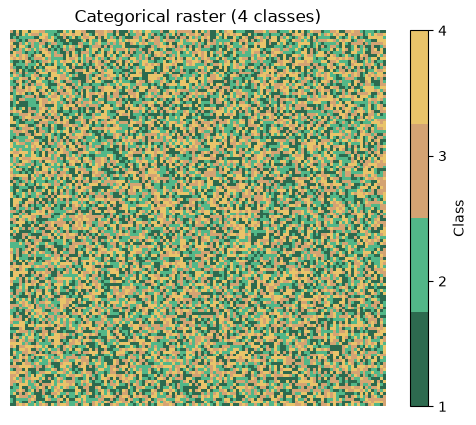
Plot the categorical raster with a discrete colormap.
import matplotlib.pyplot as plt
from matplotlib.colors import ListedColormap

cmap = ListedColormap(["#2d6a4f", "#52b788", "#d4a373", "#e9c46a"])

fig, ax = plt.subplots(figsize=(5, 5))
im = ax.imshow(raster, cmap=cmap, interpolation="nearest")
ax.set_title("Categorical raster (4 classes)")
cbar = fig.colorbar(im, ax=ax, ticks=[1, 2, 3, 4], shrink=0.8)
cbar.set_label("Class")
ax.set_axis_off()
plt.tight_layout()
plt.show()
Polygonize → GeoPandas → Plot
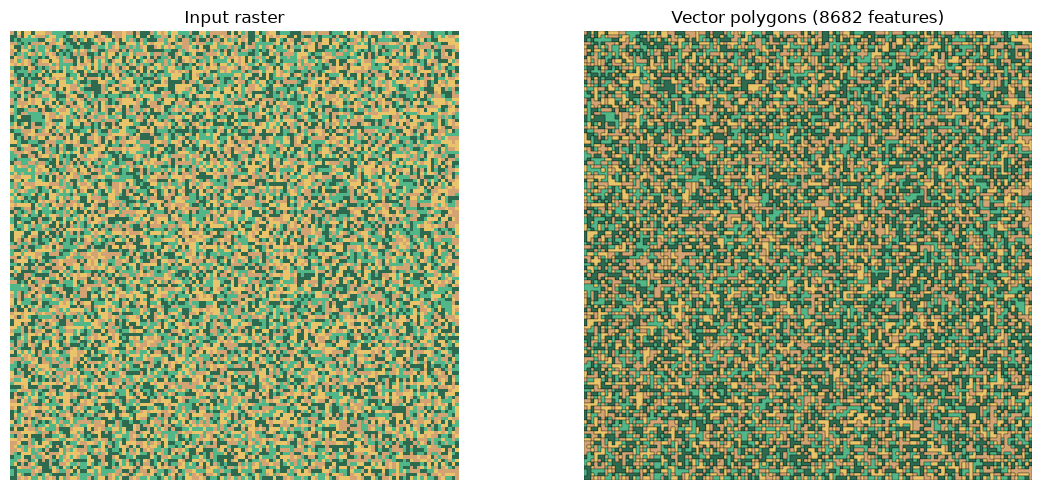
Convert the raster to vector polygons and visualize with GeoPandas.
import geopandas as gpd

# One-liner: Arrow table → GeoDataFrame
gdf = gpd.GeoDataFrame.from_arrow(shapes_arrow(raster, connectivity=4))
print(f"GeoDataFrame: {len(gdf)} rows")
print(gdf.head())

# Plot polygons colored by class value
fig, axes = plt.subplots(1, 2, figsize=(12, 5))

# Left: original raster
height, width = raster.shape
axes[0].imshow(
    raster,
    cmap=cmap,
    interpolation="nearest",
    extent=(0, width, height, 0),
)
axes[0].set_title("Input raster")
axes[0].set_axis_off()
axes[0].set_xlim(0, width)
axes[0].set_ylim(height, 0)
axes[0].set_aspect("equal")

# Right: vector polygons
color_map = {1.0: "#2d6a4f", 2.0: "#52b788", 3.0: "#d4a373", 4.0: "#e9c46a"}
gdf["color"] = gdf["value"].map(color_map)
gdf.plot(ax=axes[1], color=gdf["color"], edgecolor="black", linewidth=0.2)
axes[1].set_title(f"Vector polygons ({len(gdf)} features)")
axes[1].set_axis_off()
axes[1].set_xlim(0, width)
axes[1].set_ylim(height, 0)
axes[1].set_aspect("equal")

plt.tight_layout()
plt.show()
GeoDataFrame: 8682 rows
                                        geometry  value
0            POLYGON ((0 0, 1 0, 1 1, 0 1, 0 0))    3.0
1            POLYGON ((2 0, 3 0, 3 1, 2 1, 2 0))    4.0
2            POLYGON ((3 0, 4 0, 4 2, 3 2, 3 0))    1.0
3  POLYGON ((4 0, 6 0, 6 1, 5 1, 5 2, 4 2, 4 0))    4.0
4            POLYGON ((6 0, 7 0, 7 1, 6 1, 6 0))    1.0
Contours (continuous rasters)
Marching squares isobands for continuous fields like DEMs, probability maps, or heatmaps.
from contourrs import contours, contours_arrow

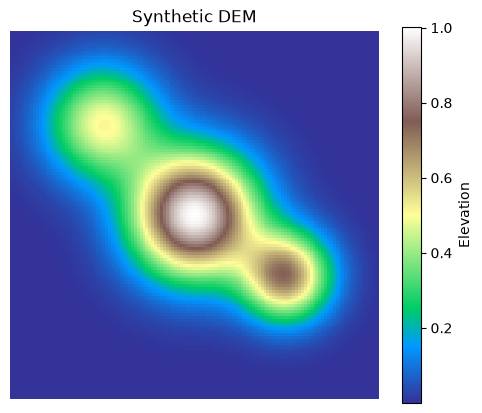
# Synthetic elevation model: sum of Gaussians
y, x = np.mgrid[-3:3:128j, -3:3:128j]
dem = (
    np.exp(-(x**2 + y**2))
    + 0.7 * np.exp(-((x - 1.5) ** 2 + (y - 1) ** 2) / 0.5)
    + 0.5 * np.exp(-((x + 1.5) ** 2 + (y + 1.5) ** 2) / 0.8)
).astype(np.float32)

fig, ax = plt.subplots(figsize=(5, 5))
im = ax.imshow(dem, cmap="terrain", interpolation="nearest")
ax.set_title("Synthetic DEM")
fig.colorbar(im, ax=ax, shrink=0.8, label="Elevation")
ax.set_axis_off()
plt.tight_layout()
plt.show()
Extract contour bands and convert to GeoPandas
thresholds = [0.1, 0.3, 0.5, 0.7, 0.9, 1.1]

# GeoJSON output
result = contours(dem, thresholds=thresholds)
print(f"Contour bands: {len(result)} polygons")
for geom, val in result[:5]:
    print(
        f"  band [{val:.1f}, ...): {geom['type']}, {len(geom['coordinates'])} ring(s)"
    )

# Arrow → GeoPandas one-liner
gdf_contour = gpd.GeoDataFrame.from_arrow(contours_arrow(dem, thresholds=thresholds))
print(f"\nGeoDataFrame: {len(gdf_contour)} rows")
print(gdf_contour.head())
Contour bands: 7 polygons
  band [0.1, ...): Polygon, 2 ring(s)
  band [0.3, ...): Polygon, 3 ring(s)
  band [0.5, ...): Polygon, 1 ring(s)
  band [0.5, ...): Polygon, 3 ring(s)
  band [0.7, ...): Polygon, 2 ring(s)

GeoDataFrame: 7 rows
                                            geometry  value
0  POLYGON ((7.747 33, 7.716 32, 7.728 31, 7.782 ...    0.1
1  POLYGON ((18.219 33, 18.172 32, 18.197 31, 18....    0.3
2  POLYGON ((29.496 33, 29.385 32, 29.628 31, 30 ...    0.5
3  POLYGON ((45.382 63, 45.341 62, 45.342 61, 45....    0.5
4  POLYGON ((50.613 64, 50.562 63, 50.583 62, 50....    0.7
Plot contour bands
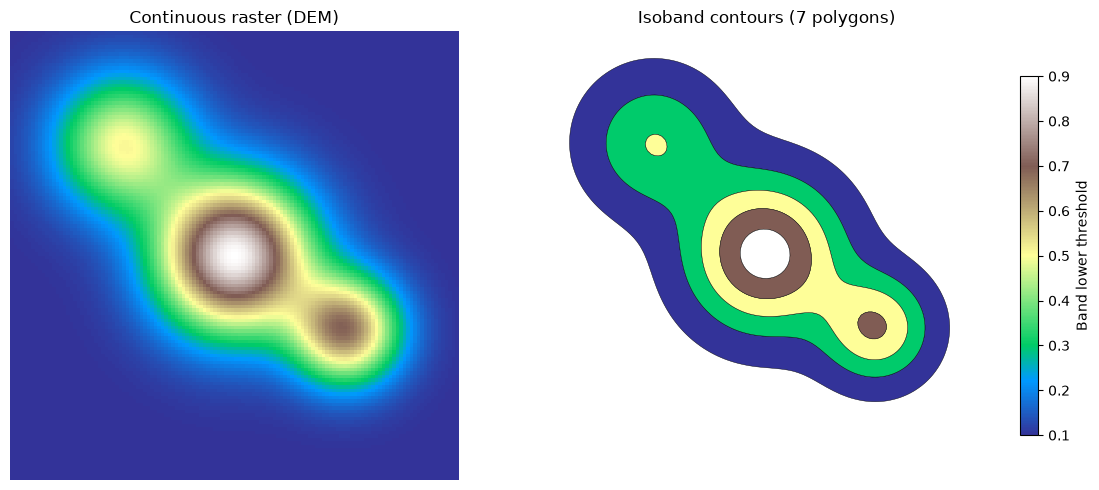
Side-by-side: continuous raster vs filled contour polygons.
fig, axes = plt.subplots(1, 2, figsize=(12, 5))
height, width = dem.shape

# Left: continuous DEM
axes[0].imshow(
    dem,
    cmap="terrain",
    interpolation="nearest",
    extent=(0, width, height, 0),
)
axes[0].set_title("Continuous raster (DEM)")
axes[0].set_axis_off()
axes[0].set_xlim(0, width)
axes[0].set_ylim(height, 0)
axes[0].set_aspect("equal")

# Right: filled contour polygons
gdf_contour.plot(
    ax=axes[1],
    column="value",
    cmap="terrain",
    edgecolor="black",
    linewidth=0.3,
    legend=True,
    legend_kwds={"label": "Band lower threshold", "shrink": 0.8},
)
axes[1].set_title(f"Isoband contours ({len(gdf_contour)} polygons)")
axes[1].set_axis_off()
axes[1].set_xlim(0, width)
axes[1].set_ylim(height, 0)
axes[1].set_aspect("equal")

plt.tight_layout()
plt.show()