Tiled polygonization tutorial
Polygonize categorical rasters in tiles with contourrs.shapes_arrow,
merge same-class neighbors across tile boundaries, and visualize.
We start with a small synthetic example, then apply the same workflow to a real USDA Cropland Data Layer raster.
from pathlib import Path

import geopandas as gpd
import matplotlib.pyplot as plt
import numpy as np
import pandas as pd
import rasterio
from contourrs import shapes_arrow
from matplotlib.colors import ListedColormap
from rasterio.windows import Window
Synthetic raster
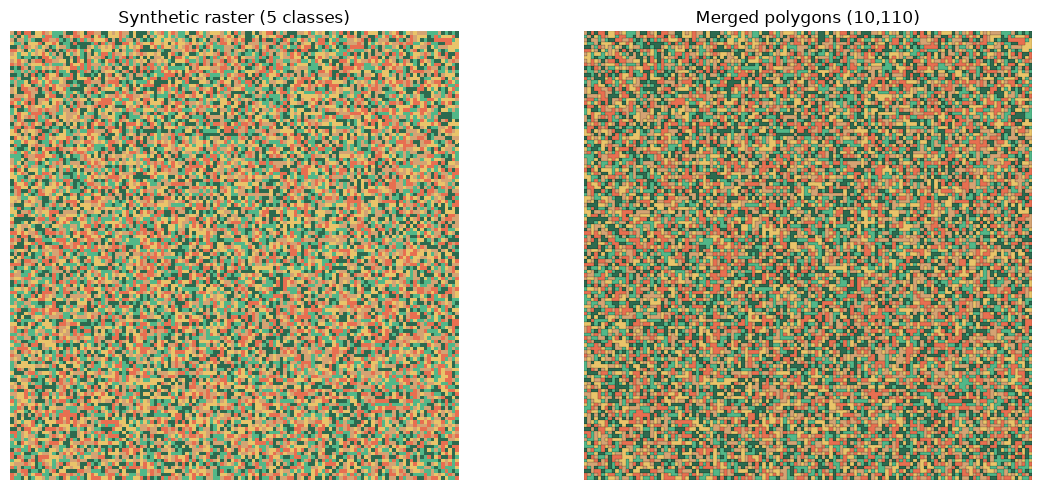
Create a small 128x128 categorical raster with 5 classes and demonstrate tiled polygonization + merge on it first.
rng = np.random.default_rng(42)
synthetic = rng.integers(1, 6, size=(128, 128), dtype=np.uint8)
print(f"Shape: {synthetic.shape}, classes: {np.unique(synthetic)}")
Shape: (128, 128), classes: [1 2 3 4 5]
Tiled polygonization (synthetic)
Split into 64x64 tiles, polygonize each, then dissolve to merge tile-boundary artifacts.
tile_size = 64
h, w = synthetic.shape
frames = []

for row_off in range(0, h, tile_size):
    for col_off in range(0, w, tile_size):
        tile = synthetic[
            row_off : row_off + tile_size, col_off : col_off + tile_size
        ].copy()
        # Affine: (scale_x, shear_x, offset_x, shear_y, scale_y, offset_y)
        transform = (1.0, 0.0, float(col_off), 0.0, 1.0, float(row_off))
        table = shapes_arrow(tile, connectivity=4, transform=transform)
        if table.num_rows > 0:
            frames.append(gpd.GeoDataFrame.from_arrow(table))

tiled_syn = gpd.GeoDataFrame(pd.concat(frames, ignore_index=True), geometry="geometry")
tiled_syn["value"] = tiled_syn["value"].astype("int32")
print(f"Raw tiled polygons: {len(tiled_syn):,}")

merged_syn = tiled_syn.dissolve(by="value", as_index=False).explode(
    index_parts=False, ignore_index=True
)
merged_syn = merged_syn[~merged_syn.geometry.is_empty]
merged_syn["value"] = merged_syn["value"].astype("int32")
merged_syn = merged_syn[["value", "geometry"]]
print(f"Merged polygons:    {len(merged_syn):,}")
Raw tiled polygons: 10,156


Merged polygons:    10,110
Synthetic raster and merged polygons
colors = ["#2d6a4f", "#52b788", "#d4a373", "#e9c46a", "#e76f51"]
cmap = ListedColormap(colors)
h, w = synthetic.shape

fig, axes = plt.subplots(1, 2, figsize=(12, 5))

axes[0].imshow(synthetic, cmap=cmap, interpolation="nearest", extent=(0, w, h, 0))
axes[0].set_title("Synthetic raster (5 classes)")

color_map = dict(zip(range(1, 6), colors, strict=False))
merged_syn["color"] = merged_syn["value"].map(color_map)
merged_syn.plot(ax=axes[1], color=merged_syn["color"], edgecolor="black", linewidth=0.1)
axes[1].set_title(f"Merged polygons ({len(merged_syn):,})")

for ax in axes:
    ax.set_axis_off()
    ax.set_xlim(0, w)
    ax.set_ylim(h, 0)
    ax.set_aspect("equal")

plt.tight_layout()
plt.show()
Real raster: USDA Cropland Data Layer
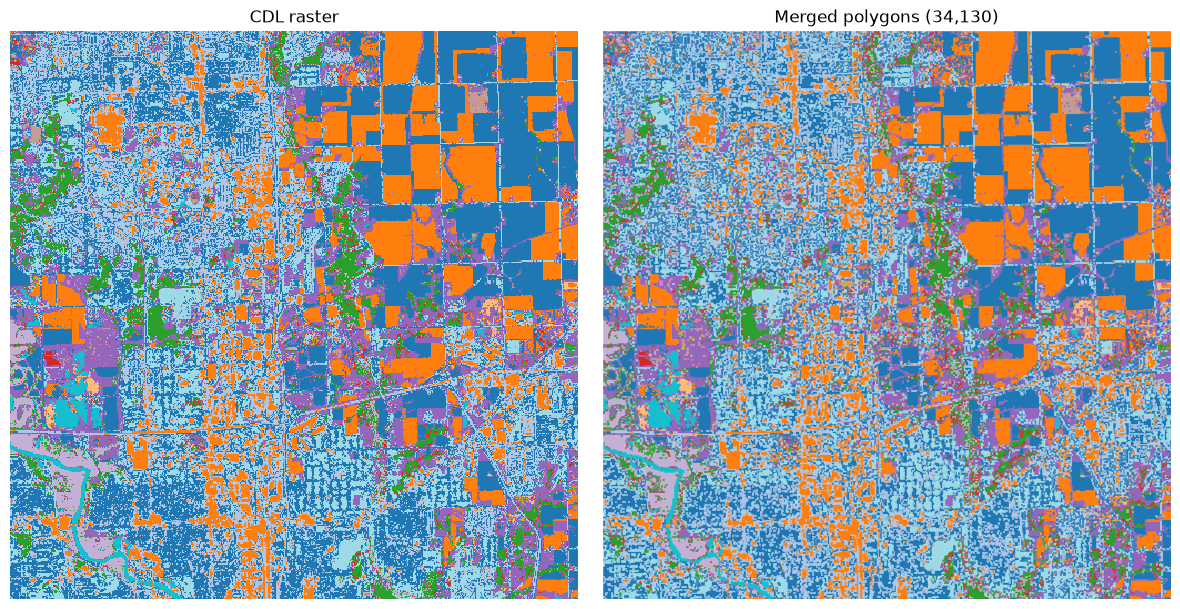
A 512x512 crop of the 2023 CDL for Polk County, Iowa. 31 land-cover classes, 30 m resolution, EPSG:5070.
raster_path = Path("data/cdl_2023_polk_512.tif")
if not raster_path.exists():
    raster_path = Path("examples/data/cdl_2023_polk_512.tif")

with rasterio.open(raster_path) as src:
    print(f"Size: {src.width}x{src.height}")
    print(f"CRS: {src.crs}")
    print(f"dtype: {src.dtypes[0]}, nodata: {src.nodata}")
    data = src.read(1)
    print(f"Classes: {len(np.unique(data))}")
Size: 512x512
CRS: EPSG:5070
dtype: uint8, nodata: None
Classes: 31
Helper: transform tuple
contourrs accepts an Affine object or a 6-element tuple (a, b, c, d, e, f).
The helper below demonstrates the tuple representation.
Polygonize in tiles
Read the raster in 128x128 tiles, polygonize each tile with
shapes_arrow, and collect the results into one GeoDataFrame.
tile_size = 128
connectivity = 4
frames = []

with rasterio.open(raster_path) as src:
    rows = range(0, src.height, tile_size)
    cols = range(0, src.width, tile_size)
    total_tiles = len(rows) * len(cols)
    print(
        f"Raster {src.width}x{src.height}, tile_size={tile_size}, tiles={total_tiles}"
    )

    for row_off in rows:
        for col_off in cols:
            window = Window.from_slices(
                (row_off, min(row_off + tile_size, src.height)),
                (col_off, min(col_off + tile_size, src.width)),
            )
            block = src.read(1, window=window)
            mask = block != 0
            if src.nodata is not None:
                mask &= block != src.nodata
            if not mask.any():
                continue

            table = shapes_arrow(
                block,
                mask=mask,
                connectivity=connectivity,
                transform=transform_tuple(src.window_transform(window)),
            )
            if table.num_rows == 0:
                continue

            tile_gdf = gpd.GeoDataFrame.from_arrow(table)
            tile_gdf = gpd.GeoDataFrame(
                {
                    "value": tile_gdf["value"],
                    "geometry": tile_gdf.geometry,
                },
                geometry="geometry",
                crs=tile_gdf.crs,
            )
            frames.append(tile_gdf)

    crs = src.crs

tiled = gpd.GeoDataFrame(
    pd.concat(frames, ignore_index=True),
    geometry="geometry",
)
tiled["value"] = tiled["value"].astype("int32")
tiled.set_crs(crs, inplace=True)

print(f"Raw tiled polygons: {len(tiled):,}")
Raster 512x512, tile_size=128, tiles=16
Raw tiled polygons: 34,793
Merge same-class neighbors
Dissolve polygons that share the same class value, then explode multipolygons back to individual geometries. This merges tile-boundary artifacts.
merged = tiled.dissolve(by="value", as_index=False).explode(
    index_parts=False, ignore_index=True
)
merged = merged[~merged.geometry.is_empty]
merged["value"] = merged["value"].astype("int32")
merged = merged[["value", "geometry"]]

print(f"Merged polygons: {len(merged):,}")
print(f"Classes: {sorted(merged['value'].unique())}")
Merged polygons: 34,130
Classes: [np.int32(1), np.int32(4), np.int32(5), np.int32(6), np.int32(12), np.int32(21), np.int32(24), np.int32(26), np.int32(27), np.int32(28), np.int32(29), np.int32(36), np.int32(37), np.int32(44), np.int32(53), np.int32(58), np.int32(59), np.int32(70), np.int32(111), np.int32(121), np.int32(122), np.int32(123), np.int32(124), np.int32(131), np.int32(141), np.int32(142), np.int32(143), np.int32(152), np.int32(176), np.int32(190), np.int32(195)]
CDL raster and merged polygons
Side-by-side comparison of the original CDL raster and the merged vector polygons.
from matplotlib.colors import BoundaryNorm

with rasterio.open(raster_path) as src:
    raster = src.read(1)
    bounds = src.bounds

extent = (bounds.left, bounds.right, bounds.bottom, bounds.top)

# Discrete colormap: one color per class, shared across both panels
classes = [int(c) for c in sorted(np.unique(raster))]
n = len(classes)
tab20 = plt.cm.tab20
colors_list = [tab20((i % 20 + 0.5) / 20) for i in range(n)]
cmap_cat = ListedColormap(colors_list)
boundaries = (
    [classes[0] - 0.5]
    + [(classes[i] + classes[i + 1]) / 2 for i in range(n - 1)]
    + [classes[-1] + 0.5]
)
norm = BoundaryNorm(boundaries, ncolors=n)

fig, axes = plt.subplots(1, 2, figsize=(12, 6))

axes[0].imshow(
    raster,
    cmap=cmap_cat,
    norm=norm,
    interpolation="nearest",
    extent=extent,
)
axes[0].set_title("CDL raster")

# Sort large polygons first so small detail renders on top;
# edgecolor="face" prevents anti-aliasing seams between adjacent polys.
plot_gdf = merged.copy()
plot_gdf["_area"] = plot_gdf.geometry.area
plot_gdf = plot_gdf.sort_values("_area", ascending=False).drop(columns="_area")

plot_gdf.plot(
    ax=axes[1],
    column="value",
    cmap=cmap_cat,
    norm=norm,
    edgecolor="face",
    linewidth=0.4,
    legend=False,
)
axes[1].set_title(f"Merged polygons ({len(merged):,})")

for ax in axes:
    ax.set_axis_off()
    ax.set_xlim(bounds.left, bounds.right)
    ax.set_ylim(bounds.bottom, bounds.top)
    ax.set_aspect("equal")

plt.tight_layout()
plt.show()